Requirements: Android 2.3+
Overview: Music Player (Remix) is an advanced music app with many unique features.

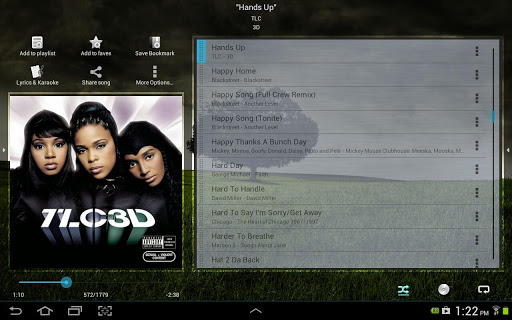
Music Player (Remix) is an advanced music app for Android designed from
the ground up to be powerful, yet user-friendly and fun to use.
The app has a large assortment of features, many of which you won't find in any other music app. They include:
- Large, finger-friendly controls on phones and tablets - Tap the album art to pause/play & skip tracks.
- While using other apps, swipe from the bottom of the screen to reveal
the "mini-player" allowing you to control your music and view/edit
your Now Playing list without leaving other apps.
- Any time you add songs to your device, the app will issue a
notification which when tapped will load those songs into a playlist
and play them.
- From anywhere within the app, swipe from the bottom to reveal music controls and the Now Playing list.
- From anywhere within the app, swipe from the right side to access
your music library, search function, help, preferences, and aesthetic
options including wallpaper & menu color customization.
- From anywhere within the app, swipe from the left side of the screen
to access your faves (one-touch access to songs/albums/artists),
playlists, and autolists (auto-generated playlists based upon your
listening habits).
- 5 customizable quick shortcuts are available on the Now Playing
screen. Assign various functions to each one included Add to Playlist,
Save bookmark, Lyrics, Share song, View YouTube video, and much more.
- All screens are optimized for portrait and landscape orientations.
- The Now Playing screen has been designed to take advantage of the extra screen space on 7" and 8.9"/10" tablets.
- All library browsing screens have several display and sorting options.
- Save bookmarks in a song and visual markers will appear on the
scrubber bar. Tap previous/next to jump between bookmarks or use the
"View Bookmarks" option to select a bookmark.
- Any time you play a song, a bookmark is automatically saved when you
leave the song. To go back to the previous play position in a song,
use the "View Bookmarks" option.
- Download album art for any song or album. Select from several
choices with different image resolutions. Album art is embedded
directly in the music files.
- Download lyrics for a song which are embedded directly in the music
file (or optionally saved in an external text file). Pinch/zoom the
lyrics to change the font size. Feel like singing along? Use the
karaoke feature to record yourself as you view the lyrics.
- Advanced playlist management including drag/drop song re-ordering
& multi-add mode. While in multi-add mode, go to any screen within
the app and tap songs/albums/artists/genres/composers to quickly add
them to the playlist.
- When viewing an artist, swipe between the song list, the album list,
and the artist's wiki page. Wiki options are also available on the
album, genre, and composer info screens.
- Stylish 4x1 and 4x2 home screen widgets.
- Various lock screen control options including basic controls (ICS+),
advanced mini-player controls (ICS+), or the 4x2 widget (Android
4.2+).
- Fine-tuned controls for quickly skipping backward and forward by 5,
30, or 60 seconds. Long-tap the pause/play tap area to reveal (or hide)
the controls.
- And much, much more!!!
I hope you enjoy using Music Player (Remix). If you have any questions
about the app, feel free to contact me via email or Twitter
(@MusicRemixApp or @Hedami).
Permissions description:
android.permission.BROADCAST_STICKY: Broadcasting current song info
android.permission.WAKE_LOCK: Keeping the music service running while music is playing
android.permission.READ_EXTERNAL_STORAGE: Reading karaoke files & album art temp files
android.permission.WRITE_EXTERNAL_STORAGE: Storing lyric data, album art data, & karaoke files
android.permission.INTERNET: Downloading lyrics, album art, wiki info, & youtube video links
android.permission.RECORD_AUDIO: Recording karaoke sessions
android.permission.SYSTEM_ALERT_WINDOW: Displaying the mini-player
Download
http://www.androidnature.com/applications/20757.htm